
A Smarter Charging Routine for the Hoverfly T3
Published: 14.SEP.2026



Know the Battery You Are Managing
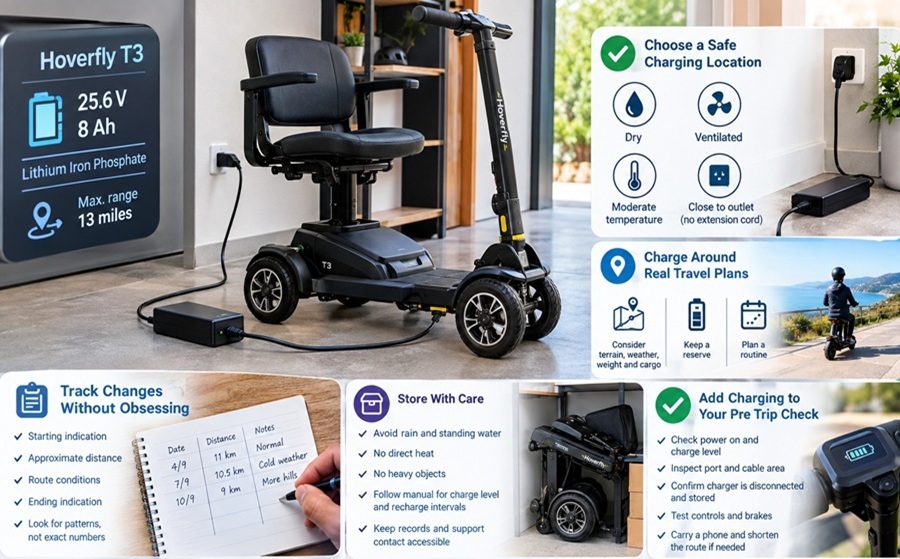
The Hoverfly T3 product information lists a 25.6 volt 8 amp hour lithium iron phosphate battery and a maximum range of 13 miles. Battery chemistry matters because care guidance is not interchangeable across every scooter. Use the charger supplied or approved for this model and follow the current manual for connection order, indicator lights, charging time, and storage. Avoid advice copied from an unrelated lead acid or lithium ion product when the manufacturer's instructions are available.
Choose One Safe Charging Location
A good charging area is dry, ventilated, protected from temperature extremes, and close enough to a suitable outlet that no extension cord crosses a walkway. Keep paper, fabric, and clutter away from the charger. Position the scooter so the cable will not be pulled, pinched, or trapped by a door. The area should also be easy to inspect. If the plug, charger case, port, or cable appears damaged or unusually hot, stop and seek model specific support instead of continuing the routine.
Charge Around Real Travel Plans
Use the published range as a planning reference, not a reason to drain the battery on every outing. Rider and cargo weight, hills, cold weather, rough surfaces, starts, and stops all affect real distance. Estimate the complete round trip and keep a reserve. Charging after planned use can simplify the next departure, but the timing and long term storage method should follow the manual. A predictable schedule is easier to maintain than occasional emergency charging immediately before an appointment.
Track Changes Without Obsessing Over Numbers
For several weeks, make a simple note of the starting indication, approximate distance, route conditions, and ending indication. This creates a practical baseline for the rider's normal errands. The display may not provide laboratory precision, so look for patterns rather than exact percentages. If the same trip begins using noticeably more charge, inspect obvious factors such as temperature, tire condition, added cargo, or route changes. Contact support if performance changes sharply or the battery does not charge as expected.
For current product details, review hoverfly t3 on the official Hoverfly page.
Store the Scooter With Care
The T3 folds for storage, but the battery and charger still need a stable environment. Avoid rain, standing water, direct heat, and places where the scooter could be struck by vehicles or heavy objects. Do not place items on controls or cables. For periods of nonuse, follow the manual's instructions for charge level and recharge intervals rather than guessing. Keep the purchase record, battery information, and support contact accessible so a caregiver or family member can follow the same model specific procedure.
Add Charging to the Pre Trip Check
Before leaving, confirm that the scooter powers on normally and that the available charge suits the route. Inspect the port cover and cable area, then make sure the charger has been disconnected and stored. Test controls and brakes in the first few feet. Carry a phone and shorten the route when weather or terrain will demand more energy. A smarter charging routine does not promise maximum mileage every time. It gives the rider a reliable process for planning, observing, and responding before range becomes a problem.
Practical Takeaway
Charging records do not need to be complicated. A calendar mark after charging, plus a note when range or indicator behavior seems unusual, is often enough. Keep receipts and battery information in the same folder. If support is needed, provide the model, serial details, charger behavior, recent route conditions, and any visible warning. Clear observations help distinguish a route related change from a possible equipment issue and reduce the temptation to try an unsafe substitute charger.
Filed in: / Technology / Mobility Scooter Battery
Advertising