
How to Make and Apply UV DTF Transfers
Published: 18.MAY.2026



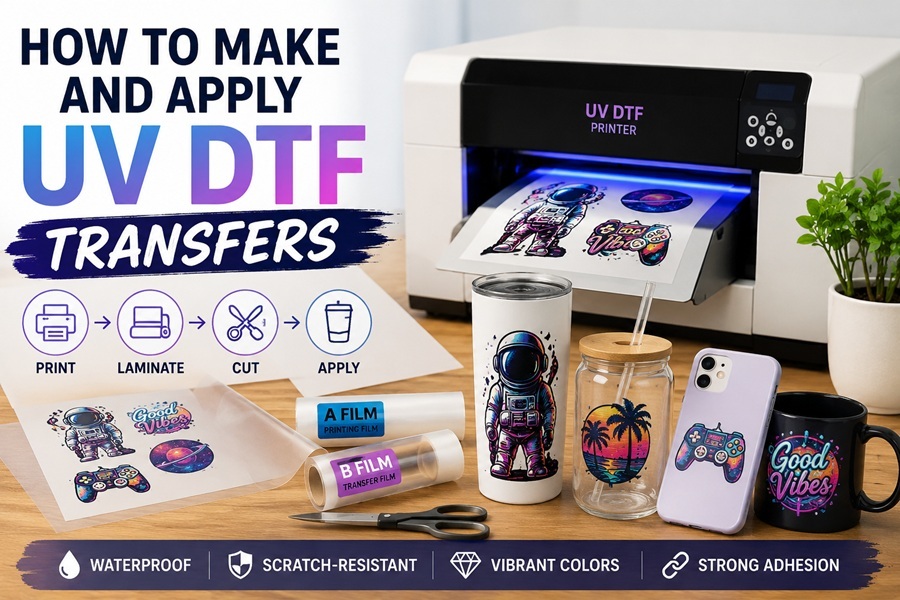
UV DTF transfers are a simple and popular way to add full-color designs to hard surfaces like tumblers, phone cases, mugs, laptops, and more. Unlike regular DTF that works on fabric, UV DTF creates strong, glossy stickers that stick well without heat in most cases. They are waterproof, scratch-resistant, and look professional.
This guide walks you through the whole process in easy steps. It is perfect for beginners who want to start making custom items at home or for small business.
What Is UV DTF and how does it differ from Regular DTF
UV DTF stands for Ultra Violet Direct to Film. You print your design on a special film using UV inks that cure quickly under UV light. The result is a ready-to-stick decal with built-in adhesive.
Regular DTF uses powder and heat presses for clothing. UV DTF focuses on hard goods. It needs no powder, no heat for curing the ink, and the final transfer often applies by hand pressure. The prints have a nice raised, glossy finish that feels durable.
Many people use UV DTF for custom gifts, product branding, and home decor projects because it works on curved and uneven surfaces.
Supplies You Need to Get Started
To make UV DTF transfers, you will need:
● A UV DTF printer
● UV inks (usually CMYK plus white and sometimes clear)
● A film set (A film for printing and B film for transfer)
● Design software and RIP software for the printer
● Laminator or manual laminating tools
● Scissors or a cutting machine
● Alcohol wipes for cleaning surfaces
You can find good equipment, films, and inks at dtflinko.com. They also have helpful resources for new users.
Step 1: Prepare Your Design
Start with a high-quality image. Use programs like Photoshop, Illustrator, or free tools like Canva. Make sure the design has good resolution — at least 300 DPI works well.
Set the size to match your final item. You do not always need to mirror the image like in regular DTF, but check your printer instructions. Many UV DTF setups print the design right way up.
Load your design into the RIP software that comes with your printer. This software controls color, white ink layer, and UV curing settings.
Step 2: Print on the A Film
Load the A film (the printing film) into your UV DTF printer. The printer lays down the colors and white ink as needed. UV lights inside or right after the printer cure the ink instantly so it does not smudge.
Print in a clean area to avoid dust. Most small UV DTF printers work with A3 or A4 sizes, which is great for beginners.
Step 3: Laminate with B Film
After printing and curing on the A film, you laminate it with the B film. The B film adds the adhesive layer and protective cover.
You can use a manual laminator or even careful hand rolling for small jobs. Line up the films carefully and press them together evenly. This step combines everything into one strong transfer sheet.
Let it sit for a short time if your instructions recommend it. The lamination bonds the layers and activates the adhesive.
Step 4: Cut Out Your Design
Cut around your design using scissors or a plotter cutter. Leave a small border around the edge for easier handling.
Many people make gang sheets — multiple designs on one big film — to save time and material.
Step 5: Apply the UV DTF Transfer
Applying UV DTF is easier than many other methods because you usually do not need a heat press.
First, clean the target surface really well with alcohol wipes. Remove all dust, oils, and fingerprints. The surface must be completely dry.
Peel the backing from your transfer. Position the design carefully on the item. For curved surfaces like tumblers, start from one side and slowly press it down to avoid air bubbles.
Use firm pressure with your fingers or a squeegee to make sure it sticks flat. Some transfers benefit from a quick press in a heat press at low temperature, but many work perfectly with hand application.
Slowly peel away the top carrier film at the right angle. Go slow to keep the design in place.
Tips for Best Results When Making UV DTF Transfers
● Keep your printer clean. UV inks can clog heads if you skip maintenance.
● Test prints on scrap film first to check colors and settings.
● Store films and printed transfers in a cool, dry place away from direct sunlight.
● For best adhesion, apply to smooth surfaces like glass, metal, plastic, acrylic, or wood.
● On very curved items, warm the transfer slightly with a heat gun to make it more flexible.
Common Mistakes to Avoid
New users sometimes forget to clean the surface properly, which causes peeling later. Others rush the lamination step and end up with bubbles or weak bonds.
Do not over-cure or under-cure the print. Follow your specific printer settings. Cutting too close to the design can damage edges.
Always do a few test applications on similar materials before doing big orders.
Benefits of Using UV DTF Transfers
UV DTF gives you bright, full-color prints with excellent detail. The transfers are waterproof and can handle daily use. They work on surfaces where vinyl or regular stickers fail.
You can produce small batches quickly without big setup costs like screen printing. It is also great for personalized gifts and small business products like custom tumblers or phone cases.
Startup Considerations
A basic UV DTF setup costs more than regular DTF at the start because of the printer and UV inks. But per-print costs drop quickly once you get going.
If you are looking to buy equipment, check out UV DTF printers for sale options that fit your space and budget. For recommendations on good starter models, view more ideas for startups.
Aftercare and Durability
Once applied, UV DTF transfers last a long time. Hand-wash items or use mild soap. Avoid harsh chemicals or dishwashers for the first few days if possible. On hard surfaces, they resist scratches better than many sticker types.
With good application, your designs should stay bright and attached for years.
UV DTF opens up many creative possibilities beyond t-shirts. You can decorate almost any hard item quickly and professionally. The process has a short learning curve once you try it a few times.
Start with simple designs and basic items like mugs or phone cases. Practice the full workflow from design to application. Soon you will make consistent, high-quality transfers that impress customers.
Filed in: / DIY & Decoration / UV DTF Transfers
Advertising